> ## Documentation Index
> Fetch the complete documentation index at: https://docs.linkeezy.com/llms.txt
> Use this file to discover all available pages before exploring further.
> Everything you need to know about getting setup on Linkeezy.
# Start Here 🦦
## Watch this demo
## Signing up
Get your Linkeezy account set up in under 3 minutes. Just [sign up for your 7-day free trial](https://app.linkeezy.com/auth/signup), no credit card required to get started.
**Here's what to do next:**
1. After you create your Linkeezy account, you'll be prompted to download the [Chrome Extension](https://chromewebstore.google.com/detail/linkeezy/nlkajcmlkkgiajbdfdbbicmjcffiheff). This is required in order for the Linkeezy application to properly work.
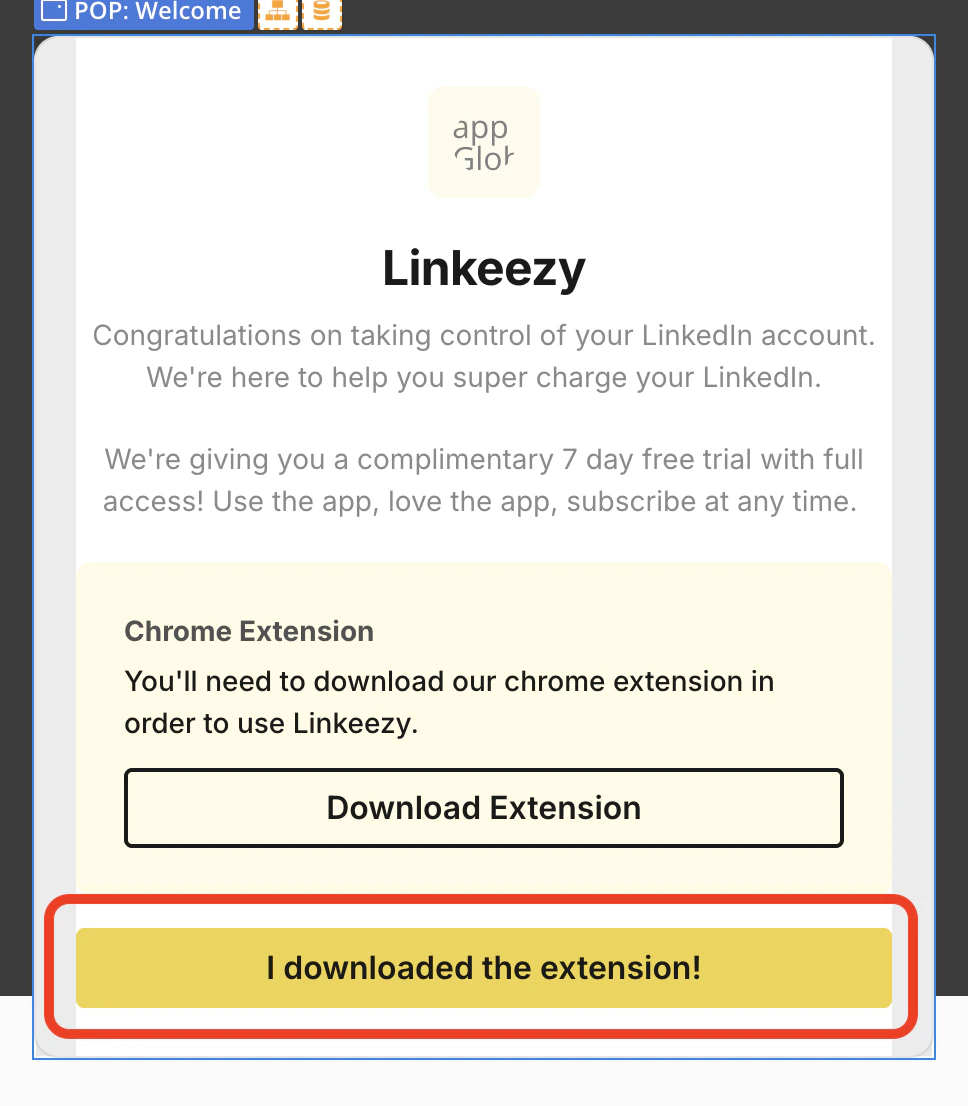
2. After you've downloaded the extension, go back to Linkeezy and click the "I downloaded the extension!" button on the pop up prompt. This closes the pop up and then our app automatically detects your extension is active.
3. Lastly, just ensure you have your LinkedIn profile open in another tab when you are using Linkeezy. Our extension fetches your active LinkedIn session to pull in your messages and content. Without the extension or your LinkedIn open in a tab, Linkeezy won't work. But don't worry if you forget, a pop up reminder will come up on the screen if LinkedIn is not detected.
## And viola! 🤌
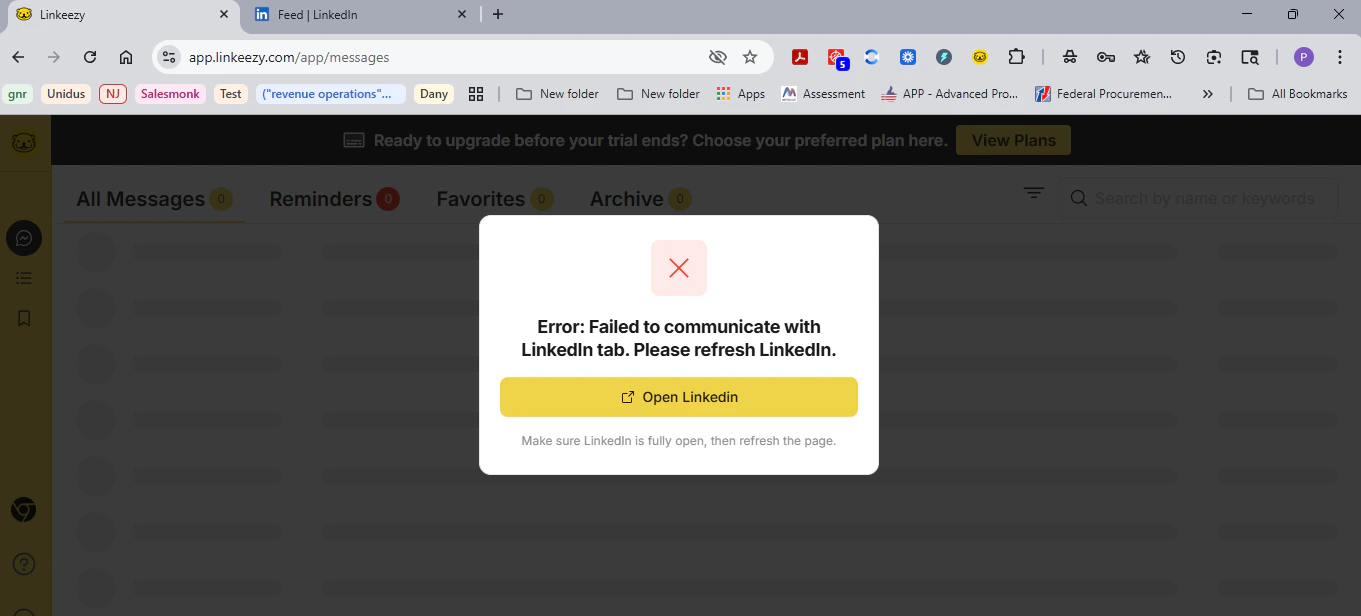
If you see a warning about the LinkedIn tab, even if you have the tab open:
Just do a **refresh of the tab where you are logged into Linkeezy**.
Typically, when you click the "Open LinkedIn" CTA on the warning, that will trigger an automatic refresh of Linkeezy to sync and fetch. Done.
However, if you have LinkedIn open in a tab already and that warning pops up, it might already be in sleep mode, hence why you'll need to manually refresh Linkeezy to awaken the LinkedIn tab.
That will resolve this 99% of the time.
If it doesn't, it's possible you have a browser extension that is interfering with ours. We have yet to come across this in most extensions we use at the same time, but there is possibility of this. If that is the case, test disable extensions to see which is causing the problem.
***Note: our app and extension does not store any of your LinkedIn info, data, or content in the app. There is no data scraping, no AI, no auto replying or reacting, and no platform manipulation. You have full human control and that’s what LinkedIn should be, no bot or AI slop here. Read more in our compliance article.***
## Detailed guides
For more in-depth explanations and frequently asked questions about how things work in Linkeezy, check out the rest of the docs below.
Everything about the LinkedIn inbox manager for your DMs.
Everything about creating focused feeds of people and topics.
Everything about searching and organizing all your saved posts.
How we ensure compliance with LinkedIn's Terms of Service.
 3. Lastly, just ensure you have your LinkedIn profile open in another tab when you are using Linkeezy. Our extension fetches your active LinkedIn session to pull in your messages and content. Without the extension or your LinkedIn open in a tab, Linkeezy won't work. But don't worry if you forget, a pop up reminder will come up on the screen if LinkedIn is not detected.
## And viola! 🤌
If you see a warning about the LinkedIn tab, even if you have the tab open:
3. Lastly, just ensure you have your LinkedIn profile open in another tab when you are using Linkeezy. Our extension fetches your active LinkedIn session to pull in your messages and content. Without the extension or your LinkedIn open in a tab, Linkeezy won't work. But don't worry if you forget, a pop up reminder will come up on the screen if LinkedIn is not detected.
## And viola! 🤌
If you see a warning about the LinkedIn tab, even if you have the tab open:
 Just do a **refresh of the tab where you are logged into Linkeezy**.
Typically, when you click the "Open LinkedIn" CTA on the warning, that will trigger an automatic refresh of Linkeezy to sync and fetch. Done.
However, if you have LinkedIn open in a tab already and that warning pops up, it might already be in sleep mode, hence why you'll need to manually refresh Linkeezy to awaken the LinkedIn tab.
That will resolve this 99% of the time.
If it doesn't, it's possible you have a browser extension that is interfering with ours. We have yet to come across this in most extensions we use at the same time, but there is possibility of this. If that is the case, test disable extensions to see which is causing the problem.
Just do a **refresh of the tab where you are logged into Linkeezy**.
Typically, when you click the "Open LinkedIn" CTA on the warning, that will trigger an automatic refresh of Linkeezy to sync and fetch. Done.
However, if you have LinkedIn open in a tab already and that warning pops up, it might already be in sleep mode, hence why you'll need to manually refresh Linkeezy to awaken the LinkedIn tab.
That will resolve this 99% of the time.
If it doesn't, it's possible you have a browser extension that is interfering with ours. We have yet to come across this in most extensions we use at the same time, but there is possibility of this. If that is the case, test disable extensions to see which is causing the problem.